Creating a home workspace that supports your productivity and suits your personal needs can make a significant difference to your work life. Whether you work remotely full-time or occasionally take work home, a carefully designed workspace helps you stay focused, reduces stress, and improves your overall comfort.
In this post, we’ll explore practical tips for setting up a home workspace that works for you, covering everything from location and furniture to lighting and organisation.
Choose the Right Location
Find a Quiet Spot
Select a space in your home where you can concentrate without frequent interruptions. Ideally, choose a room where household noise is minimal and where you won’t be distracted by everyday activities.
If a separate room isn’t available, consider corners of living rooms or bedrooms that can be dedicated as your workspace.
Consider Natural Light
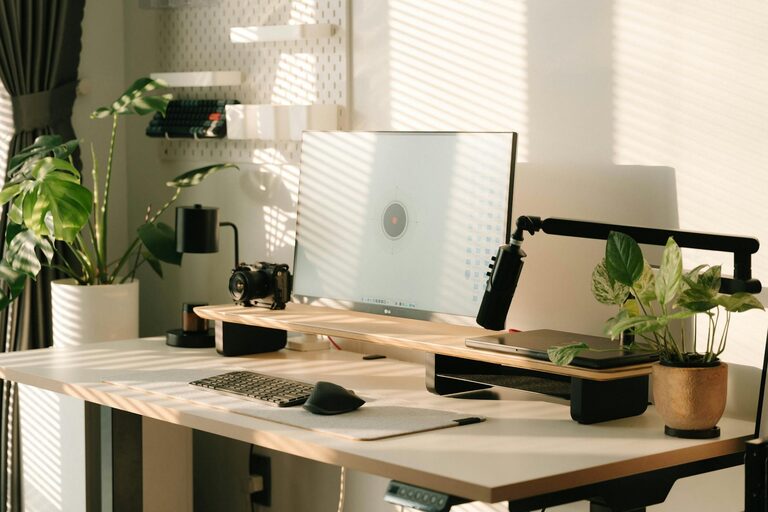
Natural light can boost mood and alertness. Position your desk near a window if possible, but make sure it doesn’t cause screen glare. If natural light is limited, investing in quality artificial lighting will help prevent eye strain.
Invest in Ergonomic Furniture
Desk and Chair
Comfort is essential for long hours of work. Choose a desk that suits your space and work style—whether it’s a traditional desk, standing desk, or adjustable workstation.
Your chair should provide good lumbar support and be adjustable in height to maintain proper posture. Sitting for prolonged periods can cause discomfort, so consider using a chair designed for office use.
Accessories for Comfort
Ergonomic accessories such as an external keyboard, mouse, and laptop stand can reduce strain on your wrists and neck. A footrest may also help maintain a good posture.
Maintain Organisation and Minimise Clutter
Effective Storage Solutions
Keep your workspace tidy by using shelves, drawers, or filing cabinets to store documents, stationery, and other essentials. Clear surfaces help reduce distractions and promote focus.
Use Cable Management
Arrange cables with clips, ties or cable trays to avoid tangles and a messy look. This simple step can improve both safety and aesthetics.
Tailor The Space To Your Work Habits
Personalise Your Workspace
Add elements that inspire you, such as plants, artwork, or photos. This makes the workspace more inviting and reflects your personality, helping you feel more comfortable.
Adapt To Your Work Type
If you need space for meetings or creative work, ensure your desk area has room for notebooks, drawing materials, or other tools. Alternatively, if you primarily use a computer, your setup can be more streamlined.
Manage Lighting and Screen Position
Balanced Lighting
Combine natural light with adjustable artificial light. Desk lamps with adjustable brightness and colour temperature allow you to fine-tune lighting depending on the time of day.
Position Your Screen Correctly
Place your monitor at eye level and about an arm’s length away to reduce eye strain and neck discomfort. If you use multiple screens, arrange them ergonomically to avoid repetitive head turning.
Minimise Distractions
Set Boundaries
Communicate work hours with family or housemates to limit interruptions. Using noise-cancelling headphones or soft background music can also help you concentrate.
Keep Technology Handy But Controlled
Ensure your technology is reliable and accessible but avoid unnecessary devices or apps that may divert your attention during work.
Establish a Work Routine
Consistent Schedule
Starting and finishing work at regular times helps create boundaries between work and personal life, which is especially important when working at home.
Take Regular Breaks
Incorporate short breaks into your day to stretch, rest your eyes, and refresh your mind.
Maintain Air Quality and Temperature
Ventilation
Good air circulation keeps you alert and comfortable. Open windows when possible or use an air purifier if necessary.
Temperature Control
Set your workspace temperature to a comfortable level. Being too hot or cold can distract from work.
Final Thoughts
Designing a home workspace tailored to your needs involves more than just picking a desk and chair. By considering location, comfort, lighting, organisation, and personal preferences, you create an environment that promotes productivity and well-being.
Remember, your workspace should evolve with your needs, so don’t hesitate to adjust your setup over time for the best results.
Creating a productive home workspace can improve your work experience significantly. Start with a few simple changes today and enjoy a more focused and comfortable workday!
About the Author